Showing posts with label Drivers. Show all posts
Showing posts with label Drivers. Show all posts
[FIX] - Amazon Kindle Fire & Nook Tablet USB Driver Problems
The Amazon Kindle Fire and the Nook Tablet are the most budget and popular android tablets today. Both of these two tablets have no USB driver software, because the USB driver is contained in its utilities. Generally, if you installed the uitility correctly, you wouldn’t have any problem with USB driver, as it would be installed spontaneously to your computer.
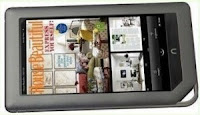 While we have found many Nook Tablet & Kindle Fire users encountered problems when the USB driver was installed, and fortunately we have also found a trick about fixing the USB driver issue on Nook Tablet, we think it should help you.
 While we have found many Nook Tablet & Kindle Fire users encountered problems when the USB driver was installed, and fortunately we have also found a trick about fixing the USB driver issue on Nook Tablet, we think it should help you.
Kindle Fire Driver Problems In Windows XP & Windows 7
While the Kindle Fire has been a sales sensation, some owners have had some early complaints about usb drivers, bugginess, particularly with the touchscreen. Amazon has done its best to remedy those problems with a new Kindle Fire update (6.2.1) which already rolled out. But still a large number of

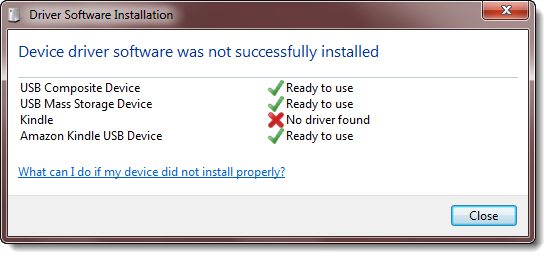
users are still encountering the problems related to usb drivers on windows XP & Windows 7, these issues are discussed on different forums with very helpful solutions some of those solution are listed in this post below. We had already discussed some of these solutions in our earlier post on Kindle fire driver problems & solution.
Kindle Fire Driver Problems & Solutions
Weeks after the release of Kindle fire, several users are still having problems related to drivers. Here we have mentioned some problems faced by users and their solution / response. Amazon will be working hard on it and hopefully they are fixed in the recent update.
Problem

On connecting a new Kindle Fire to my computer, the Windows upgrade program couldn't find drivers for the Kindle, so it still lacks drivers. Does anyone know how I can find the Kindle Drivers?
Response / Solution
P. Burks says:
"Customer Service saw my post here and called me. They said that there is no driver and that the Fire needs to be open (not in sleep mode) before plugging it in to the computer. I connected it and again got that message about installing the driver, so I just clicked on "Don't Ask Me This Again" and the box opens up for Window Explorer to show the folders. I disconnected and plugged in again and the message about trying to install a driver is now gone and I can go directly to Windows Explorer to see the folders in the Fire."
"My windows 7 computers did the same thing. However, when I unlock the fire the computer can access the drive, even though it still tells me it needs a driver."
"Customer Service saw my post here and called me. They said that there is no driver and that the Fire needs to be open (not in sleep mode) before plugging it in to the computer. I connected it and again got that message about installing the driver, so I just clicked on "Don't Ask Me This Again" and the box opens up for Window Explorer to show the folders. I disconnected and plugged in again and the message about trying to install a driver is now gone and I can go directly to Windows Explorer to see the folders in the Fire."
"My windows 7 computers did the same thing. However, when I unlock the fire the computer can access the drive, even though it still tells me it needs a driver."
3rd Party Drivers – OSx86
This is a list of known 3rd party, independently developed drivers for OSx86 which aren't shipped with the Standard OSx86 Installation DVD. So feel free to add your own tested and working drivers.
If you don't find a driver for your device, you may also try to patch an existing kernel extension to add support for your device.
Subscribe to:
Posts (Atom)


