Showing posts with label Microsoft. Show all posts
Showing posts with label Microsoft. Show all posts
Kindle Fire Driver Problems In Windows XP & Windows 7
While the Kindle Fire has been a sales sensation, some owners have had some early complaints about usb drivers, bugginess, particularly with the touchscreen. Amazon has done its best to remedy those problems with a new Kindle Fire update (6.2.1) which already rolled out. But still a large number of

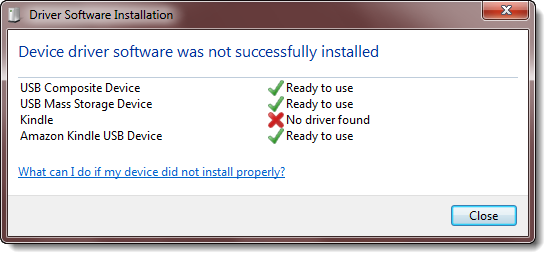
users are still encountering the problems related to usb drivers on windows XP & Windows 7, these issues are discussed on different forums with very helpful solutions some of those solution are listed in this post below. We had already discussed some of these solutions in our earlier post on Kindle fire driver problems & solution.
[How To] - Use Windows Phone Features on Your Android or iPhone
iPhone and Android users, feeling left out of the Windows Phone party? Fear not, for Microsoft has now launched a Windows Phone emulator which runs a browser-based demo on competing mobile operating systems.
I tested it out on my iPhone 3GS and the experience is pretty much a flawless Windows Phone interface on the devil’s phone. HTML5 powers the Windows Phone demo and allows users to tiptoe through the Metro-UI, enjoying basic functionality such as flicking through screens and selecting contacts. [UPDATE: We tested it on Android (HTC Desire Z) and it works flawlessly.The primary feature of the Windows Phone user interface are the Live Tiles. These are essentially widgets that constantly relay user information such as Twitter notifications, Facebook updates, emails and RSS feeds.
The Windows Phone emulator is an incredible test of HTML5′s mobile prowess. The interface is smooth and the depth of control mimics Windows Phone to the tee (based on my tests with previous Microsoft marvels).

I tested it out on my iPhone 3GS and the experience is pretty much a flawless Windows Phone interface on the devil’s phone. HTML5 powers the Windows Phone demo and allows users to tiptoe through the Metro-UI, enjoying basic functionality such as flicking through screens and selecting contacts. [UPDATE: We tested it on Android (HTC Desire Z) and it works flawlessly.The primary feature of the Windows Phone user interface are the Live Tiles. These are essentially widgets that constantly relay user information such as Twitter notifications, Facebook updates, emails and RSS feeds.
The Windows Phone emulator is an incredible test of HTML5′s mobile prowess. The interface is smooth and the depth of control mimics Windows Phone to the tee (based on my tests with previous Microsoft marvels).

Keen to try out the Windows mobile experience? Then visit this URL with iPhone’s Safari or the regular Android browser (we haven’t tested it with Opera, so both of you that use it, try it and let is know). Microsoft’s idea of inviting competing users within its hallowed halls is forward thinking, which comes off as an interactive commercial of sorts. It essentially aims to remove the bad taste in the mouth which previous version of Windows mobile OS imparted on its users.
How To: Install Microsoft OCS 2007 - Part 3
This should be a short post, we’ll just be finishing up the installation so you can start some OCS 2007 testing internally. I purposely chose a different internal and external domain like many companies will do so that you can see how you have to use a "split-brain" DNS model. The split part simply means that you need to have a zone defined internally that matches your external SIP domain, which is also likely to be your e-mail domain.
Configure Internal DNS
Open the DNS management tool and expand the Forward Lookup Zones folder.

Configure Internal DNS
Open the DNS management tool and expand the Forward Lookup Zones folder.
How To: Install Microsoft OCS 2007 - Part 2
Last time we left off about halfway through the OCS 2007 installer. This part should run through the end of the initial installation process. I’ll cover some of the initial configuration on the next part.
Configure Internal Certificate
The Configure Server section should now have a green checkmark next to it. Click the Run button under Configure Certificate to continue.

Configure Internal Certificate
The Configure Server section should now have a green checkmark next to it. Click the Run button under Configure Certificate to continue.
How To: Install Microsoft OCS 2007 - Part 1
Assumed Pre-Existing Environment

This will be the first part of many in showing the steps necessary for standing up an OCS 2007 server. In the examples that follow the internal domain name is ptown.com and the SIP domain, or my external facing address will be confusedamused.com
tap-dc-2k3.ptown.com
Domain Controller for ptown.com
DNS Server for ptown.com
Certificate Authority named P-Town Certificate Authority
Domain in 2003 Native Mode
IP Configuration: 192.168.0.10 / 24
Gateway: 192.168.0.1
DNS: 127.0.0.1
tap-ocs-2k7.ptown.com
Blank Windows 2003 Server joined to the ptown.com domain
IIS Installed with ASP.net enabled
Adminpak.exe installed
IP Configuration: 192.168.0.20 / 24
Gateway: 192.168.0.1
DNS: 192.168.0.10
Schema Preparation
This will be the first part of many in showing the steps necessary for standing up an OCS 2007 server. In the examples that follow the internal domain name is ptown.com and the SIP domain, or my external facing address will be confusedamused.com
tap-dc-2k3.ptown.com
Domain Controller for ptown.com
DNS Server for ptown.com
Certificate Authority named P-Town Certificate Authority
Domain in 2003 Native Mode
IP Configuration: 192.168.0.10 / 24
Gateway: 192.168.0.1
DNS: 127.0.0.1
tap-ocs-2k7.ptown.com
Blank Windows 2003 Server joined to the ptown.com domain
IIS Installed with ASP.net enabled
Adminpak.exe installed
IP Configuration: 192.168.0.20 / 24
Gateway: 192.168.0.1
DNS: 192.168.0.10
Schema Preparation
Detailed Comparison Virtualization Server [Citrix Xenserver vs MS Hyper-V vs Red Hat Virt. vs Vmware vShpere]
Virtualization is now viewed as viable for companies of all sizes. VMware leads the market by a longshot but there are a number of vendors to choose from.
 But the gap is closing fast. All are viable in a production environment. The largest of companies still see virtualization as the best option but small and mid-sized companies have options to choose from as seen in this feature chart below
We have compared the leading virtualization vendors in the matrix below
Overall, VMware leads the group of vendors, which included Citrix Xen Server; Microsoft Windows Server 2008 Hyper-V R2; Red Hat Enterprise Virtualization 2.2 and VMware VSphere.
 But the gap is closing fast. All are viable in a production environment. The largest of companies still see virtualization as the best option but small and mid-sized companies have options to choose from as seen in this feature chart below
Microsoft Previews App Store For Windows 8
When you’re this far behind, all you can do is be relentlessly up-beat. Which Microsoft was last night in the barn-raiser to build dev interst in the app store for the cross-platform “Metro” apps for Windows 8 devices. The store will go live in February, and offers developers the ability to hit the countless multitudes of Windows desktop and tablet users out there (should they hopefully upgrade to Win8), and the hoped-for buyers of Windows Phones that have so far been warmly received in their Mango incarnation.
 At the same time, Google’s director of the Android Developer Ecosystem, Eric Chu, said in a blog post: “This past weekend, thanks to Android users around the world, Android Market exceeded 10 billion app downloads — with a growth rate of one billion app downloads per month.”
 At the same time, Google’s director of the Android Developer Ecosystem, Eric Chu, said in a blog post: “This past weekend, thanks to Android users around the world, Android Market exceeded 10 billion app downloads — with a growth rate of one billion app downloads per month.”
 To celebrate achieving the 10-billion download mark, Google said Android developers would offer a selection of apps a day for the next 10 days for just 10 cents each.It’s been five months since Apple announced that it had passed the 15-billion downloads milestone from its App Store.
VDI Comparison - Vmware, Microsoft, Citrix & Quest
 |
| VDI Leaders, Major Players, Contendors & Participants |
Each desktop virtualization product has its own functionality and feature-set. This comparison below describes the features in a very detailed way.We did our best to be truthful and accurate in investigating and writing-down the different features.When you see improvements please let me know @ahsantasneem.
This matrix is developed with the following virtualization products and versions:
PRODUCT VERSION
Citrix XenDesktop 5.0 December 2010
Microsoft VDI/RDS 2008 R2 SP1 (RFX) February 2011
Quest vWorkspace 7.2 December 2010
VMware View 4.6 February 2011
Legenda:
√ = Applicable; X = Not applicable; ~= It depends; #= Under investigation
RDP =Only supported with RDP; RF =Only supported with RemoteFX
PCoIP = Software implementation of PCoverIP;
Subscribe to:
Posts (Atom)


