Showing posts with label Amazon. Show all posts
Showing posts with label Amazon. Show all posts
[FIX] - Amazon Kindle Fire & Nook Tablet USB Driver Problems
The Amazon Kindle Fire and the Nook Tablet are the most budget and popular android tablets today. Both of these two tablets have no USB driver software, because the USB driver is contained in its utilities. Generally, if you installed the uitility correctly, you wouldn’t have any problem with USB driver, as it would be installed spontaneously to your computer.
 While we have found many Nook Tablet & Kindle Fire users encountered problems when the USB driver was installed, and fortunately we have also found a trick about fixing the USB driver issue on Nook Tablet, we think it should help you.
 While we have found many Nook Tablet & Kindle Fire users encountered problems when the USB driver was installed, and fortunately we have also found a trick about fixing the USB driver issue on Nook Tablet, we think it should help you.
Kindle Fire Driver Problems In Windows XP & Windows 7
While the Kindle Fire has been a sales sensation, some owners have had some early complaints about usb drivers, bugginess, particularly with the touchscreen. Amazon has done its best to remedy those problems with a new Kindle Fire update (6.2.1) which already rolled out. But still a large number of

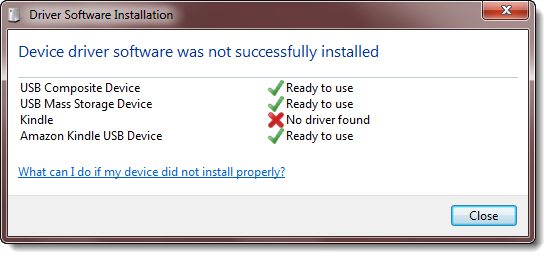
users are still encountering the problems related to usb drivers on windows XP & Windows 7, these issues are discussed on different forums with very helpful solutions some of those solution are listed in this post below. We had already discussed some of these solutions in our earlier post on Kindle fire driver problems & solution.
Step by Step Guide To Install Android 4.0 on Kindle Fire
An early build of Google Android 4.0 is now available for the Amazon Kindle Fire tablet. While developers have solved a bug affecting the “sdcard” portion of the device, there are still audio, video, and application bugs that need to be fixed.
 But if you’ve already rooted your Kindle Fire and installed TWRP 2.0 it’s actually pretty easy to take Android 4.0 Ice Cream Sandwich for a spin without much risk. You can always just revert to your previous software, whether that’s CyanogenMod 7 or Amazon’s stock software.
Be forewarned, it’s a kind of complicated process and there’s plenty of room for things to go wrong. While it’s tough to truly damage your Kindle Fire or leave it in an unbootable state, it’s pretty easy to leave it in a state that’s difficult to recover from without trying a half dozen different recovery techniques.

Be forewarned, it’s a kind of complicated process and there’s plenty of room for things to go wrong. While it’s tough to truly damage your Kindle Fire or leave it in an unbootable state, it’s pretty easy to leave it in a state that’s difficult to recover from without trying a half dozen different recovery techniques.
[How To] - Enable USB Debugging in Kindle Fire
Developers may notice that the Amazon Kindle Fire doesn’t come with a USB Debugging setting. There is no way to enable USB Debugging on the actual device to allow you to connect it to Android development tools. There is a hack available to make it work though.
Note: This tutorial assumes you have the Android SDK and platform tools installed.
Windows
1. Download and extract the Google USB Drivers.
2. Replace the android_winusb.inf file in the Google USB Driver folder with this one.
3. Connect your Kindle Fire. When it prompts you for a driver, point it to the Googleusb_driver folder. If Windows has already tried to find a driver, right-click My Computer/Computer then select Manage > Device Manager > Other Devices, then right-click Kindle and select Update Driver Software…
4. Hold down the Windows key and press R to bring up the run dialog and type %USERPROFILE% then click OK.
[How To] - Root Kindle Fire 6.2.1 Using BurritoRoot
A few days ago Amazon released an update for Kindle Fire. This update version 6.2.1 bought some great feature and performance improvements but it also broke all previous method to root Kindle Fire. Today a new root tool called BurritoRoot has been released for the Kindle Fire.
The tool is released by Android Police, a popular blog covering all about android. BurritoRoot not only works on software 6.2.1, but on all currently known versions of the Kindle Fire’s OS.

The tool is released by Android Police, a popular blog covering all about android. BurritoRoot not only works on software 6.2.1, but on all currently known versions of the Kindle Fire’s OS.

"Our own Justin Case got right to work; and after a night’s worth of coding, with a group of fellow devs helping him through the testing process, he developed a new method to root the Kindle Fire — a method that works not only on software 6.2.1, but on all currently known versions of the Fire’s OS (future updates make break this)"
Kindle Fire Driver Problems & Solutions
Weeks after the release of Kindle fire, several users are still having problems related to drivers. Here we have mentioned some problems faced by users and their solution / response. Amazon will be working hard on it and hopefully they are fixed in the recent update.
Problem

On connecting a new Kindle Fire to my computer, the Windows upgrade program couldn't find drivers for the Kindle, so it still lacks drivers. Does anyone know how I can find the Kindle Drivers?
Response / Solution
P. Burks says:
"Customer Service saw my post here and called me. They said that there is no driver and that the Fire needs to be open (not in sleep mode) before plugging it in to the computer. I connected it and again got that message about installing the driver, so I just clicked on "Don't Ask Me This Again" and the box opens up for Window Explorer to show the folders. I disconnected and plugged in again and the message about trying to install a driver is now gone and I can go directly to Windows Explorer to see the folders in the Fire."
"My windows 7 computers did the same thing. However, when I unlock the fire the computer can access the drive, even though it still tells me it needs a driver."
Major Kindle Fire Problems
The Kindle Fire is reportedly on track for a major software update in the next couple of weeks, and apparently not a moment too soon. According to a report from the New York Times, Amazon has been fielding complaints from disgruntled buyers. Even with a promised update, the complaints from some of the device’s most vocal users may not be easily fixed, because they involve hardware as well. Here are the top five complaints from users giving the tablet a one-star rating on its own Amazon page.
 buyers. Even with a promised update, the complaints from some of the device’s most vocal users may not be easily fixed, because they involve hardware as well. Here are the top five complaints from users giving the tablet a one-star rating on its own Amazon page.
Root Amazon Kindle Fire In Few Easy Steps
Steps (Windows only):
1. Tap on quick settings in the upper right corner of the screen and go to More -> Device and then toggle on “Allow Installation of Applications From Unknown Sources”
 2. Download and install the Android SDK Manager (before the installation, it will ask you to install Java SE Development Kit (JDK) if you don’t already have it installed – make sure you install it prior to installing the Android SDK Manager)
- NOTE I recommend changing the Android SDK Manager path to C:\Android
3. Run the Android SDK Manager and once it’s finished loading packages, uncheck Android 4.0 and check Android 2.3.3 and then hit “Install 5 packages…”
4. Select “Accept All” ad then hit “Install” – this will take some time. When you get a popup that says “A package that depends on ADB has been updated. Do you wish to restart ADB now” select yes
5. Once it’s complete, scroll down to the bottom of Android SDK manager’s packages list and check off “Google USB Driver package” (it’s inside of extras) and then hit
“Install 1 package…”
Subscribe to:
Posts (Atom)


