[FIX] - Amazon Kindle Fire & Nook Tablet USB Driver Problems
The Amazon Kindle Fire and the Nook Tablet are the most budget and popular android tablets today. Both of these two tablets have no USB driver software, because the USB driver is contained in its utilities. Generally, if you installed the uitility correctly, you wouldn’t have any problem with USB driver, as it would be installed spontaneously to your computer.
 While we have found many Nook Tablet & Kindle Fire users encountered problems when the USB driver was installed, and fortunately we have also found a trick about fixing the USB driver issue on Nook Tablet, we think it should help you.
 While we have found many Nook Tablet & Kindle Fire users encountered problems when the USB driver was installed, and fortunately we have also found a trick about fixing the USB driver issue on Nook Tablet, we think it should help you.
Kindle Fire Driver Problems In Windows XP & Windows 7
While the Kindle Fire has been a sales sensation, some owners have had some early complaints about usb drivers, bugginess, particularly with the touchscreen. Amazon has done its best to remedy those problems with a new Kindle Fire update (6.2.1) which already rolled out. But still a large number of

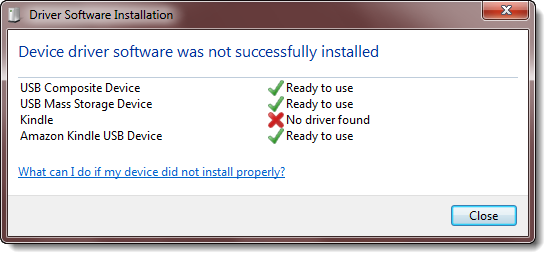
users are still encountering the problems related to usb drivers on windows XP & Windows 7, these issues are discussed on different forums with very helpful solutions some of those solution are listed in this post below. We had already discussed some of these solutions in our earlier post on Kindle fire driver problems & solution.
Step by Step Guide To Install Android 4.0 on Kindle Fire
An early build of Google Android 4.0 is now available for the Amazon Kindle Fire tablet. While developers have solved a bug affecting the “sdcard” portion of the device, there are still audio, video, and application bugs that need to be fixed.
 But if you’ve already rooted your Kindle Fire and installed TWRP 2.0 it’s actually pretty easy to take Android 4.0 Ice Cream Sandwich for a spin without much risk. You can always just revert to your previous software, whether that’s CyanogenMod 7 or Amazon’s stock software.
Be forewarned, it’s a kind of complicated process and there’s plenty of room for things to go wrong. While it’s tough to truly damage your Kindle Fire or leave it in an unbootable state, it’s pretty easy to leave it in a state that’s difficult to recover from without trying a half dozen different recovery techniques.

Be forewarned, it’s a kind of complicated process and there’s plenty of room for things to go wrong. While it’s tough to truly damage your Kindle Fire or leave it in an unbootable state, it’s pretty easy to leave it in a state that’s difficult to recover from without trying a half dozen different recovery techniques.
[How To] - Untethered JailBreak iOS 5.0.1 For A4 Devices Only
Finally, the day has arrived. The much awaited exploit from @Pod2G which was in development from few days is now released from DevTeam. You can apply the untethered from the tweak which has instantaneously come up in Cydia from @P0sixninja. If you are currently using a tethered JailBreak on iOS 5.0/iOS 5.0.1, open Cydia, search for ‘Corona’ and install it. After the reboot, you would be on an untethered JailBreak.

iPhone3GS
iPhone4
iPhone4-CDMA
iPad1
iPod touch 3G
iPod touch 4G

However, you always have the other alternative. You can download the recently updated Redsn0w from the DevTeam, run it over the tethered JailBroken iDevice , follow the instructions and you are done. Only the following A4 based devices are supported :
iPhone3GS
iPhone4
iPhone4-CDMA
iPad1
iPod touch 3G
iPod touch 4G
Subscribe to:
Posts (Atom)


